Submit More Bids.
Same Team.
Find opportunities that fit. Bring your suppliers into the process. Turn your company’s experience into a response your team can review. One workspace, from discovery to the final checklist.
Cedar Supply Co. · Sample Company
Your Next Opportunity
Select a bid to explore its fit.
Library Furniture Refresh
Cedar County Library
Scope
120 Task Chairs
Due In
12 Days
Sample Estimate
$48,000–$64,000
Why It Matches
Your furniture catalog and delivery area match the requested scope.
Confirm installation capacity before pursuing.
Less Chasing. More Progress.
Follow a sample opportunity through the work. See how discovery, supplier pricing, response drafts and AI support fit together, with your team making the decisions.
A Shortlist with a Reason Behind Every Score.
Bring your capabilities, criteria and exclusions into the review. See the fit, read the evidence, and decide where your team should spend its time.
Explore Bid ReviewScores guide your review. They are not a prediction of winning.
Opportunity Review
Cedar Supply Co. · Fictional Company
Library Furniture Refresh
Cedar County Library
Criteria Evidence
Product Keywords
The seating scope matches the sample office-furniture keywords.
Location
Cedar County is within the sample company's configured service area.
Hard Exclusions
No configured exclusion applies to this sample opportunity.
What to Check Next
Confirm installation resources and the delivery schedule before making a pursue decision.Explore each tab and try the sample controls. All examples are fictional.
Your Next Opportunity.
Now in Your Pocket.
IFX Bid now has an iPhone app. Review opportunities, make a pursue-or-pass decision and keep your pipeline close when you’re away from your desk.
Swipe to Decide
See the fit score and reasoning, then pass or move an opportunity forward.
Keep Your Pipeline Close
Check the opportunities your team is pursuing and see where work stands.
The iPhone app is currently in testing. Contact us about access; public App Store availability has not been announced.
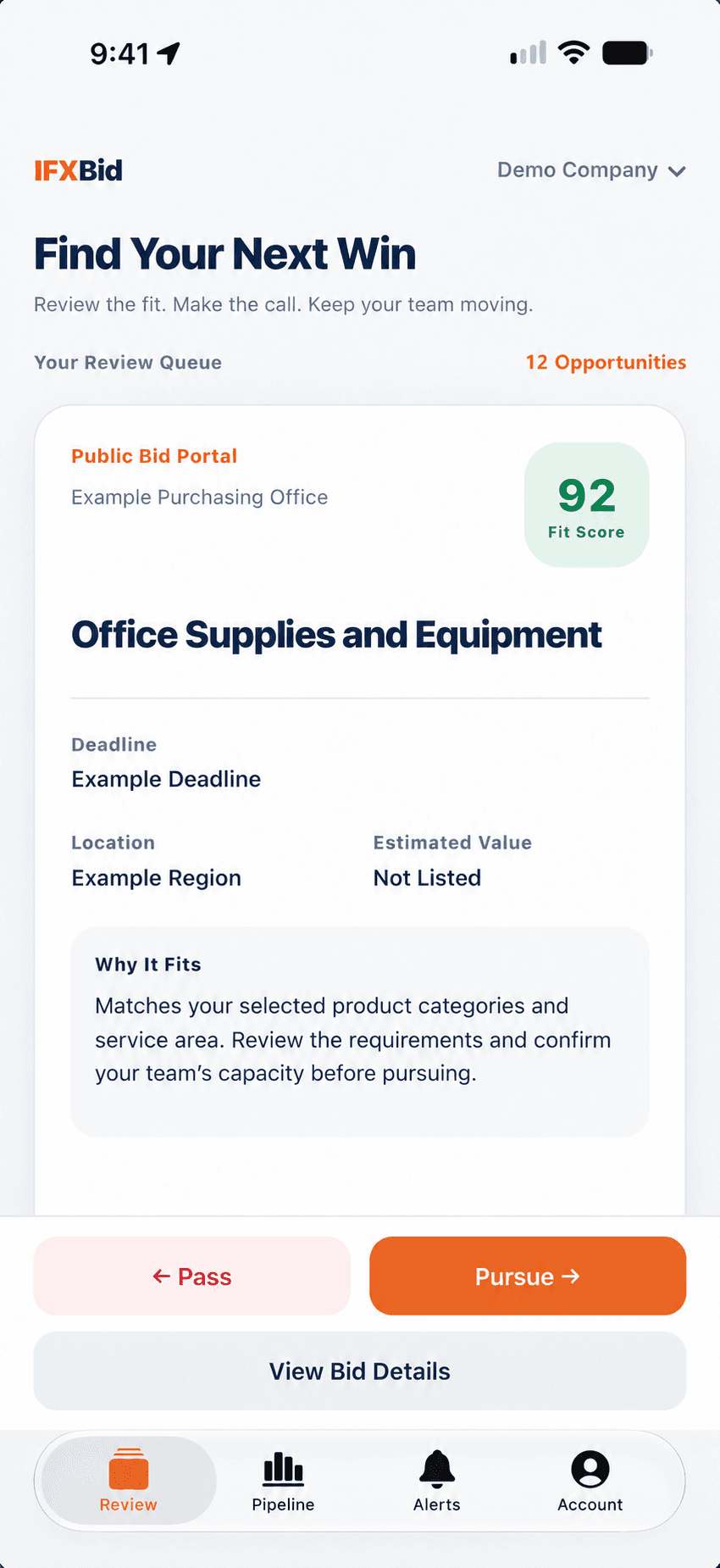
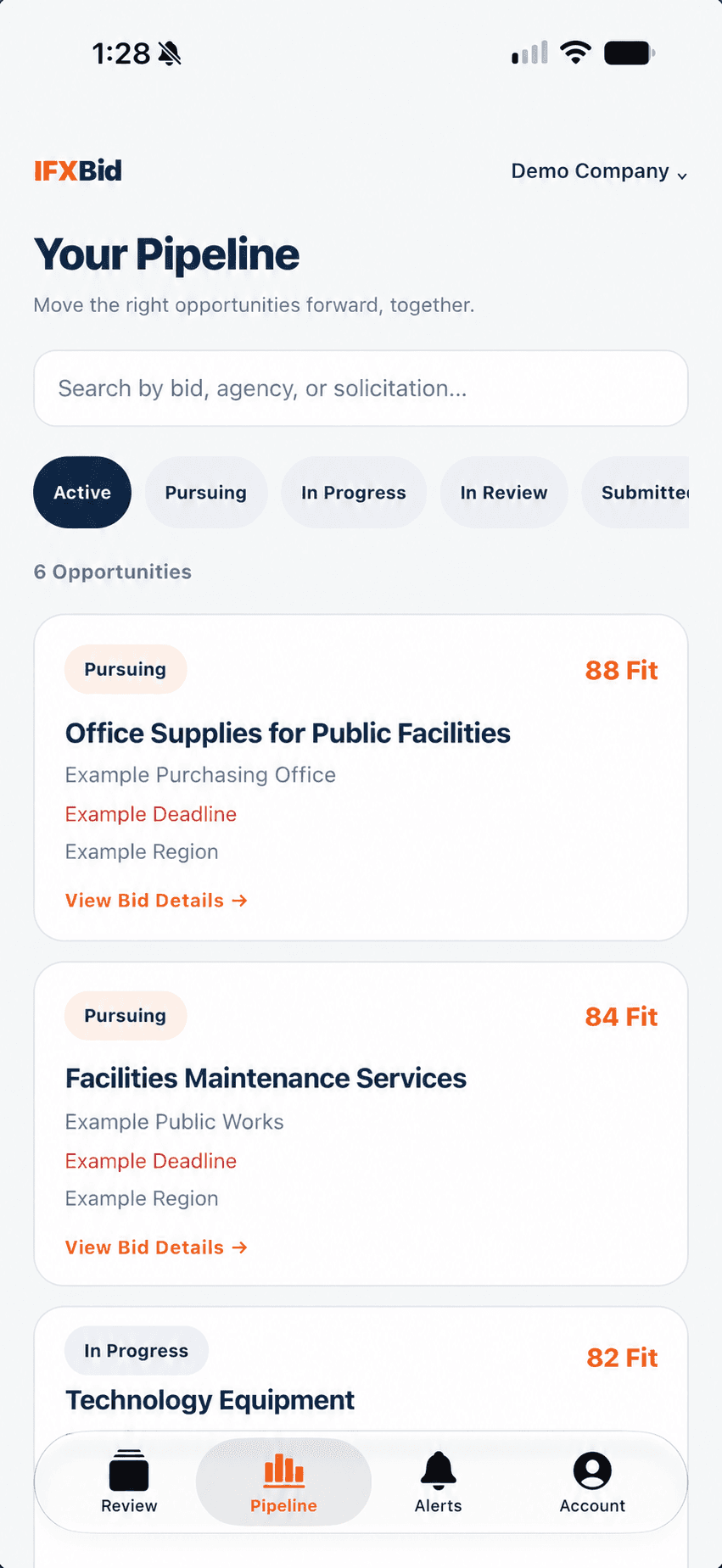
App screens shown with fictional demonstration data. Company names and opportunity details have been replaced for this preview.
Coverage Built Around Your Buyers
Discovery is the starting point. Check the sources that matter to your business, then review the available solicitation text and documents in context.
Know the Source.
Understand the Limits.
Connected federal, state and local sources feed the same workspace. Coverage is specific to each portal, and access to documents can depend on a login or an active session.
Check Source CoverageStart with Your Buyers
Check the published source inventory and the portals your team depends on.
Check Document Access
Login, session and CAPTCHA restrictions can limit what a source makes available.
Keep the Status Visible
Source monitoring helps administrators identify checks and access issues that need attention.
Some of the Bid Sites IFX Bid Reads Today
Works with Your AI Tools
Connect an MCP-compatible client such as Claude, ChatGPT or Cursor using a personal API key. The remote MCP server uses the same tools and company permissions as the in-app assistant.
A Bid Desk Workflow
An illustrative workflow, not a customer result or a promise of wins. The team reviews fit, collects supplier pricing, and checks the draft before filing with the agency.
Read the Scored List
Review opportunities from connected sources, with fit scores and reasoning informed by your company profile and criteria. Check the details before deciding.
Pursue and Gather Pricing
Move a suitable bid forward. Supplier outreach follows your company’s approval settings, and quotes collect beside the response so your team can compare them.
Approve and Submit
The draft built from your past bids comes back for your team to correct and approve. IFX Bid provides a submission checklist; your team files the response with the agency.
Priced on the Bids You Submit
Every plan and price is published, and access is by invitation while the private beta runs. Plans differ by submission capacity, connected sources, users and supplier workflows. Discovery, review and triage within your connected sources are unlimited.
Starter
Invite Only$1,257 billed quarterly,
$499/mo save 16%
A focused bid desk with a handful of sources and a shared pursuit pipeline.
+ $1,150 one-time onboarding
$1,257 for three months + $1,150 setup.
USD, before any applicable taxes. Your written agreement confirms activation and renewal dates.
- 12 Bid Submissions per Month
- 3 Supported Sources
- 5 Users
- AI Fit Scoring and Drafting
- Bid Pipeline and History
- Company Knowledge and Documents
- Email Support
- Supplier RFQs and Quote Extraction
- Calibration Reporting
Elite
Invite Only$4,317 billed quarterly,
$1,699/mo save 15%
A busier capture team, with supplier pricing and scoring calibration.
Onboarding Included $1,150
$4,317 for three months; setup included.
USD, before any applicable taxes. Your written agreement confirms activation and renewal dates.
- 100 Bid Submissions per Month
- Unlimited Supported Sources
- 25 Users
- Everything in Starter
- Supplier RFQs and Quote Extraction
- Calibration Reporting
- Roles and Permissions
- Priority Support
Multi-Company
Invite Only$8,907 billed quarterly,
$3,499/mo save 15%
One agreement for businesses under common ownership, with a separate workspace for each.
Onboarding Included $1,150
$8,907 for three months; setup included.
USD, before any applicable taxes. Your written agreement confirms activation and renewal dates.
- Unlimited Bid Submissions
- Unlimited Users
- Everything in Elite
- Companies Under Common Ownership
- Separate Company Data and Criteria
- Custom Source Scoping
- Dedicated Support Contact
What IFX Bid Is, and Who It's For
The questions we get asked before anything else.
What is IFX Bid?
IFX Bid is bid capacity software for companies that sell to government, built by Infraxio. It increases the number of bids a team can submit by automating three jobs that take a bid desk's hours: requesting quotes from your own suppliers, reviewing every solicitation against your capability statement and bid history, and drafting responses from your past bids for your team to approve. Underneath, it reads connected federal, state, county and city bid sites twice a day, so every new solicitation arrives already reviewed.
Who is IFX Bid for?
IFX Bid is for companies that sell to government and want to submit more bids without adding people to the bid desk. That includes suppliers, distributors, manufacturers, and service contractors bidding federal, state, county and city solicitations. It suits a team that already wins public work and is turning down bids for lack of hours, rather than a company looking for its first government contract.
What do I need to give IFX Bid for it to review bids like my team would?
IFX Bid needs four things to review bids the way your team would: your capability statement, your bid criteria, your hard exclusions, and your past bids. The capability statement and criteria describe what you sell, the contract sizes you handle and where you deliver. Exclusions name work you never take, and anything matching one scores zero. Past bids, loaded as Bid Examples with whether you bid and won them, show the review what your team has actually said yes to. After that, every yes or no your team gives is kept and used to tune the next round of reviews.
How do supplier quotes work?
Supplier quotes in IFX Bid go out automatically when your team marks a bid as pursuing. Quote requests are sent to your own suppliers, three suppliers per line item, with the bid's requirements attached. Replies are threaded back against the bid, quoted prices and minimum order quantities are extracted from whatever format the supplier used, and each extracted price is shown against the original message so someone can check it. Every vendor you add joins your supplier database, so the next bid has more suppliers to ask.
How does IFX Bid draft bid responses?
IFX Bid drafts each response from your own previous bids, executive summaries, references and signer block, so the draft reads like your company rather than a template. Your team corrects and approves the draft instead of writing it from a blank page, and your team owns final approval and agency filing. IFX Bid assembles the response and a submission checklist; your team files it with the agency and marks it submitted in the pipeline.
Which bid sites does IFX Bid read?
IFX Bid reads connected federal, state, county and city bid sites, whether federal, state, county or city. Today that includes SAM.gov, BidNet Direct, BidPrime, MyFloridaMarketPlace, Virginia eVA, NC eProcurement, the City of Jacksonville and others. Each site is read on its own terms rather than through a generic crawler, and adding a site your buyers use is a normal part of onboarding.
How is IFX Bid different from SAM.gov or a bid alert service?
SAM.gov and bid alert services tell you a solicitation exists; IFX Bid reviews it, quotes it and drafts it. Keyword alerts produce a feed you still have to read, price and write up, and those hours are what limit how many bids a team submits. IFX Bid scores each opportunity against your capability statement and past bids with the reasoning shown, sends quote requests to your suppliers when you pursue, and drafts the response from your previous bids for your team to approve.
Is IFX Bid construction bidding or takeoff software?
No. IFX Bid is not an estimating, takeoff or construction project management tool, and it does not compete with products like Procore or ConstructConnect. It handles the bid desk work around a public solicitation: finding it, reviewing it against your capabilities, collecting supplier quotes and drafting the response. Contractors who need a detailed takeoff still price that part of the job in the estimating tool they already run.
How is IFX Bid better than tracking bids in a spreadsheet?
A spreadsheet records bids you already found, which leaves the finding, the judging, the quoting and the writing to whoever maintains it. IFX Bid does the finding automatically across every connected bid site, applies one consistent review instead of whoever happened to read the posting, sends the supplier quote requests, and drafts the response. It also keeps why a bid was passed or lost attached to the record, so a quarter later the history tells you whether you are losing on price or on fit.
How does the AI review work?
IFX Bid reviews available solicitation text against your capability statement, bid criteria, hard exclusions and past bids, and returns a score from 0 to 100 with written reasoning, the matched keywords and the matched classification codes. Scores above 70 are worth a closer look, and anything caught by a hard exclusion is zeroed with the rule that caught it named. Each yes or no your team gives is kept, and calibration reporting shows whether the reviews are getting closer to your team's own calls.
Can I sign up for IFX Bid today?
Not yet. IFX Bid is in invite-only private beta, so accounts are opened by the Infraxio team rather than through self-serve signup. Plans and prices are published in full on the pricing page, and the way to ask for a slot is the contact form. Telling us what you bid on and which bid sites your buyers publish on lets us say straight away whether those sites are read today.
Submit More Bids with the Same Team
Load your capability statement and past bids, add your suppliers, and point IFX Bid at the bid sites your buyers publish on. Setup takes an afternoon.